


Showing posts with label Security. Show all posts
What is Double Password?
This Website has been moved to a new Domain
Sunday, January 13, 2008
Strong passwords should have a significant length and cannot contain normal words. Only random digits and letters of different case. Such passwords are extremely hard to remember and it takes time to enter. But, even strong passwords have their weaknesses. When you type a password, it can be intercepted by a spy program that logs all your keystrokes. Others can see what you type (even if the password field on the screen is masked, the password can be read by buttons you hit on your keyboard.)
Until now, the only solution was to buy a secure token. A secure token is a hardware key that is used instead of or in addition to your normal password authentication. There are two main problems with the hardware solution, though. First, it is expensive. And second, you can use them only with software that has built-in support for this method of authentication.
But, from now on, you can turn any USB flash drive into a secure token! No need to purchase an additional expensive device. All you need is about 2 megabytes of free space on your flash drive or other USB gadget, such as an MP3 player, PDA or even a USB-pluggable mobile handset.
But, from now on, you can turn any USB flash drive into a secure token! No need to purchase an additional expensive device. All you need is about 2 megabytes of free space on your flash drive or other USB gadget, such as an MP3 player, PDA or even a USB-pluggable mobile handset.

How does it work? Our software, Double Password, installs onto your flash drive. When you type a password, the program intercepts it and converts it into a super-strong password string on-the-fly. You can use simple, easy-to-remember passwords without the risk of being cracked.
Another benefit of using Double Password is that nobody can steal your passwords. Spy programs are useless. Even if someone gets the "weak" password that you type on the keyboard, it means nothing. This password will only work when your USB flash is inserted.
While typical hardware locks will work only with software that supports secure tokens, Double Password works with any software. It simply substitutes your weak password with a strong one.
Double Password can be effectively used to securely lock your Windows account, to protect your laptop and to bring a new level of security to all software that uses password authentication.
What to Do when Ur Orkut is Hacked!
This Website has been moved to a new Domain
Saturday, December 29, 2007
It can be a nightmare if someone else takes control of your Google Account because all your Google services like Gmail, Orkut, Google Calendar, Blogger, AdSense, Google Docs and even Google Checkout are tied to the same account.
Here are some options suggested by Google Support when you forget the Gmail password or if someone else takes ownership of your Google Account and changes the password:
Here are some options suggested by Google Support when you forget the Gmail password or if someone else takes ownership of your Google Account and changes the password:
1. Reset Your Google Account Password:
Type the email address associated with your Google Account or Gmail user name at google.com/accounts/ForgotPasswd - you will receive an email at your secondary email address with a link to reset your Google Account Password.
This will not work if the other person has changed your secondary email address or if you no longer have access to that address.
2. For Google Accounts Associated with Gmail:
If you have problems while logging into your Gmail account, you can consider contacting Google by filling this form. It however requires you to remember the exact date when you created that Gmail account.
3. For Hijacked Google Accounts Not Linked to Gmail:
If your Google Account doesn’t use a Gmail address, contact Google by filling this form. This approach may help bring back your Google Account if you religiously preserve all your old emails. You will be required to know the exact creation date of your Google Account plus a copy of that original “Google Email Verification” message.
It may be slightly tough to get your Google Account back but definitely not impossible if you have the relevant information in your secondary email mailbox.
Read More......
Type the email address associated with your Google Account or Gmail user name at google.com/accounts/ForgotPasswd - you will receive an email at your secondary email address with a link to reset your Google Account Password.
This will not work if the other person has changed your secondary email address or if you no longer have access to that address.
2. For Google Accounts Associated with Gmail:
If you have problems while logging into your Gmail account, you can consider contacting Google by filling this form. It however requires you to remember the exact date when you created that Gmail account.
3. For Hijacked Google Accounts Not Linked to Gmail:
If your Google Account doesn’t use a Gmail address, contact Google by filling this form. This approach may help bring back your Google Account if you religiously preserve all your old emails. You will be required to know the exact creation date of your Google Account plus a copy of that original “Google Email Verification” message.
It may be slightly tough to get your Google Account back but definitely not impossible if you have the relevant information in your secondary email mailbox.
Securing A Wireless Network Connection With WEP Or WPA
This Website has been moved to a new Domain
Tuesday, December 18, 2007
I have just set up a wireless connection at home - whenever I log on it says that the connection is unsecure - how do I secure it? I have a new Toshiba Laptop and a Phillips Router. I saw something about a WEP key....where do I enter this?
You are right to worry about this problem, actually, because any open wireless network is an invitation for neighbors and various unsavory characters to connect to your network as if they were on your local area network. This means that they'd be able to use your network-friendly printer, your networked hard drive backup system, and try to break into your computers too. In addition, they'd be able to use your network connection itself and if they were to download tons of illegal music, for example, the RIAA could get your ISP to shut you down, or if they downloaded porn or terrorism research data, well, the FBI could get involved. Not good!
Fortunately, it's pretty easy to secure a wireless network system: you need to log in to your router / base station (your Phillips unit), which is probably done by simply entering a special IP address in your Web browser (try 192.168.1.1 if the documentation that was included with the router doesn't explain). If that fails, you might need to hook the router directly to the computer via a USB cable, though those are definitely rare systems.
Once you've hooked up, you should find a multi-tab configuration tool that has one tab labeled "Security" or similar. Click on that and you should be able to find "Password" as an option or button. Click on that and it should give the options of WEP or WPA. I recommend that you choose WPA and use a long password - it's far more secure than WEP.
Here's an example from the configuration screen of my Linksys router:
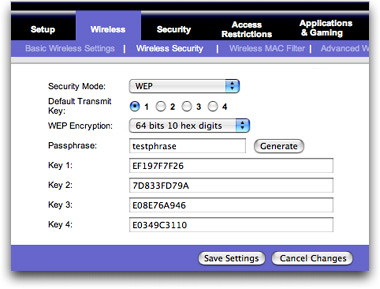
As you can see, it's a bit complicated, but once you enter a password it automatically generates all the scary looking (hexidecimal) security codes: any of those will be what you would enter on your Toshiba laptop -- once -- to be securely connected forever.
I hope that helps you get your hatches battened down!
Read More......
Fortunately, it's pretty easy to secure a wireless network system: you need to log in to your router / base station (your Phillips unit), which is probably done by simply entering a special IP address in your Web browser (try 192.168.1.1 if the documentation that was included with the router doesn't explain). If that fails, you might need to hook the router directly to the computer via a USB cable, though those are definitely rare systems.
Once you've hooked up, you should find a multi-tab configuration tool that has one tab labeled "Security" or similar. Click on that and you should be able to find "Password" as an option or button. Click on that and it should give the options of WEP or WPA. I recommend that you choose WPA and use a long password - it's far more secure than WEP.
Here's an example from the configuration screen of my Linksys router:
As you can see, it's a bit complicated, but once you enter a password it automatically generates all the scary looking (hexidecimal) security codes: any of those will be what you would enter on your Toshiba laptop -- once -- to be securely connected forever.
I hope that helps you get your hatches battened down!
Hackers Use European Storm to Spread E-Mail Attack
This Website has been moved to a new Domain
Tuesday, December 11, 2007
A massive malware attack spread throughout the world Thursday and Friday by teasing e-mail recipients to open infected messages supposedly about European wind storms. The attackers use of the subject line "230 dead as storm batters Europe" was an effective way to lure careless computer users into opening mail infected with the "Storm Worm" virus.
"Storm Worm" is the name that seems to have stuck for a massive malware Webroot AntiSpyware 30-Day Free Trial. Click here. attack that spread Thursday and Friday by teasing e-mail E-Mail Marketing Software - Free Trial. Click Here. recipients to open infected messages supposedly about European wind storms.
The attackers use of the subject line "230 dead as storm batters Europe" was an effective way to lure careless computer users into opening mail infected with the Small.DAM Trojan. Fierce winds were battering Europe simultaneously with the release of the messages.
The Trojan was launched when users clicked on attachments to the messages that said "Full Clip.exe," "Full Story.exe," "Read More.exe" and "Video.exe."
Different Variations
However, the perpetrators also sent similarly infected, but differently titled, messages to thousands of other inboxes. These messages titillated readers into clicking the attachments by suggesting they would see videos of U.S. Secretary of State Condoleeza Rice kicking German Chancellor Angela Merkel which, unlike the storm, did not actually happen.
Others offered information or video pertaining to "British Muslims Genocide," "Naked teens attack home director" and "A killer at 11, he's free at 21 and kill again!"
The interesting part of the attack was the creativity and timing, according to Graham Cluley, senior technology consultant for Sophos Latest News about Sophos. "Everyone is concentrating on the storm angle of it, which is only one headline of course," he said. "That was topical in Europe, where we've had some very, very bad weather. But another worthwhile thing to consider is the way they were trying to use humor to get people to open the mail as well."
Many people enjoy reading jokes or weird news tidbits sent by e-mail, Cluley noted. "People who receive that and think they got a video attached to the e-mail might think, 'That sounds funny. I might just click on it to have a look.' This is taking advantage of the way people share jokes and videos. It's not just the news aspect of it. There is all sorts of social engineering going on here."
Topical Messages Enhance Effectiveness
The attack shows that hackers are staying abreast of world news. The European storm message was "created and launched literally as the storm raged," according to Helsinki, Finland-based security company F-Secure Latest News about F-Secure.
The attack was powerful and widespread but, apparently, short-lived, F-Secure's Chief Research Officer Mikko Hypponen told TechNewsWorld.
"This is over," he added. "They stopped the attack. Whoever sent this isn't doing it anymore. Looking at the rate of e-mails being sent, we believe they were targeting European users and it was a nine-hour window starting [Thursday] night and finishing at about 10 a.m. [Friday morning]."
The storm-related message was apparently meant to be awaiting users in the morning, according to Hypponen.
"The people woke up and saw news about a massive storm," he explained. "They went to work and found an e-mail about the storm in their inboxes. Of course it's going to work much better than the usual attack. They gained access to probably tens of thousands of computers in Europe."
Zombie Network
The hackers, before the Thursday-through-Friday attack, had already gained control of thousands of PCs by prior malware infection, Hypponen noted. "They instructed those computers to do this 10-hour spam run. They had a very large [zombie] network See the HP StorageWorks All-in-One Storage System. Click here.. Now it's much larger."
The "huge attack" might have worked too well, in a sense, suggested Sophos' Cluley. "The fact that this is making headlines actually works against the hackers" because so many people and antivirus companies are now aware of the incident, thanks to its creative and "colorful" nature.
Read More......
The attackers use of the subject line "230 dead as storm batters Europe" was an effective way to lure careless computer users into opening mail infected with the Small.DAM Trojan. Fierce winds were battering Europe simultaneously with the release of the messages.
The Trojan was launched when users clicked on attachments to the messages that said "Full Clip.exe," "Full Story.exe," "Read More.exe" and "Video.exe."
Different Variations
However, the perpetrators also sent similarly infected, but differently titled, messages to thousands of other inboxes. These messages titillated readers into clicking the attachments by suggesting they would see videos of U.S. Secretary of State Condoleeza Rice kicking German Chancellor Angela Merkel which, unlike the storm, did not actually happen.
Others offered information or video pertaining to "British Muslims Genocide," "Naked teens attack home director" and "A killer at 11, he's free at 21 and kill again!"
The interesting part of the attack was the creativity and timing, according to Graham Cluley, senior technology consultant for Sophos Latest News about Sophos. "Everyone is concentrating on the storm angle of it, which is only one headline of course," he said. "That was topical in Europe, where we've had some very, very bad weather. But another worthwhile thing to consider is the way they were trying to use humor to get people to open the mail as well."
Many people enjoy reading jokes or weird news tidbits sent by e-mail, Cluley noted. "People who receive that and think they got a video attached to the e-mail might think, 'That sounds funny. I might just click on it to have a look.' This is taking advantage of the way people share jokes and videos. It's not just the news aspect of it. There is all sorts of social engineering going on here."
Topical Messages Enhance Effectiveness
The attack shows that hackers are staying abreast of world news. The European storm message was "created and launched literally as the storm raged," according to Helsinki, Finland-based security company F-Secure Latest News about F-Secure.
The attack was powerful and widespread but, apparently, short-lived, F-Secure's Chief Research Officer Mikko Hypponen told TechNewsWorld.
"This is over," he added. "They stopped the attack. Whoever sent this isn't doing it anymore. Looking at the rate of e-mails being sent, we believe they were targeting European users and it was a nine-hour window starting [Thursday] night and finishing at about 10 a.m. [Friday morning]."
The storm-related message was apparently meant to be awaiting users in the morning, according to Hypponen.
"The people woke up and saw news about a massive storm," he explained. "They went to work and found an e-mail about the storm in their inboxes. Of course it's going to work much better than the usual attack. They gained access to probably tens of thousands of computers in Europe."
Zombie Network
The hackers, before the Thursday-through-Friday attack, had already gained control of thousands of PCs by prior malware infection, Hypponen noted. "They instructed those computers to do this 10-hour spam run. They had a very large [zombie] network See the HP StorageWorks All-in-One Storage System. Click here.. Now it's much larger."
The "huge attack" might have worked too well, in a sense, suggested Sophos' Cluley. "The fact that this is making headlines actually works against the hackers" because so many people and antivirus companies are now aware of the incident, thanks to its creative and "colorful" nature.
How Safe is Your Computer?
This Website has been moved to a new Domain
Tuesday, November 20, 2007

Security Facts about an average computer user
- 70% users Install a lot of softwares or games which he finds interesting.
- 80%of the user are not ready to update their system with latest patches.
- 60% of the user don’t know if there system is secure.
- 70% user don’t know how to find if the system is really secure
So how do you find if your system is secure and patched with latest patches and updates. Security System Analyzer (SSA) is a tool designed to check your system for the latest security updates. This tool can scan your system and find out the vulnerabilities about the missing patches and updates and provide you a link from where to get.
Features of SSA
- Finds security vulnerabilities and the missing patches for windows.
- Gives a direct link to possible patches to be used to remove the security hole.
- Supports Windows 2000, XP, Vista.
- One click to get the information about latest security vulnerabilities and others.
- Generates HTML reports which makes view easy and can be exported.
Open Vulnerability and Assessment Language (OVAL) is an international, information security, community standard to promote open and publicly available security content, and to standardize the transfer of this information across the entire spectrum of security tools and services. OVAL includes a language used to encode system details, and an assortment of content repositories held throughout the community.

How SSA works?
This software completes the whole process in 3 steps:
- Representing configuration information of systems for testing;
- Analyzing the system for the presence of the specified machine state (vulnerability, configuration, patch state, etc.)
- Reporting the results of this assessment

Resources
- Download: ssa-setup.exe (9.9 MB)
- Documentation: ssa-manual.pdf
This tool has an excellent feedback and does not require any user to be geeky. You just need to run the tool and find out whats not secured.
So how you keep track of your PC security? Do share with us in comments and we can discuss.
Read More......Remove Brontok Virus Urself
This Website has been moved to a new Domain
Saturday, November 17, 2007
It is the Most "Sticky Virus" ..
The Brontok Virus is a computer worm that affects computers running Microsoft Windows. It spreads by sending itself to email addresses harvested from the affected computer. But Now you can Remove it on your Own. It Really works! And now you can have a good sleep because now you will be able to remove the most sticky virus "The Brontok Virus".
- Start ur computer in safe mode with command prompt and type the following command to enable registry editor:-
reg delete HKCU\software\microsoft\windows\currentversion\policies\system /v "DisableRegistryTools"
and run HKLM\software\microsoft\windows\currentversion\policies\system /v "DisableRegistryTools"
- After this your registry editor will be enabled
- Now type explorer
- Goto Run and type regedit
- Then follow the following path :-
HKLM\Software\Microsoft\Windows\Currentversion\Run
on the right side delete the entries which contain 'Brontok' and 'Tok-' words.
- After that restart your system
- Now open registry editor and follow the path to enable folder option in tools menu
HKCU\Software\Microsoft\Windows\Currentversion\Policies\Explorer\ 'NoFolderOption'
delete this entry and restart ur computer
- Now search *.exe files in all drives (search in hidden files also)
remove all files which are display like as folder icon.
Congratulations! Now your computer is completely free from Brontok Virus
Read More......
Ultra Strong Passwords
This Website has been moved to a new Domain
As some Microsoft Operating System geeks know, you can type many more characters than are on a standard keyboard by using the ALT+NUMPAD combination technique. For example, by holding down the ALT key, typing 234 on the number pad, then releasing ALT gives you the O character. I'm writing this article mostly because when I search around for information on the topic of ALT+Number key combos I find pages that are lacking in details. Most of the pages I found are coming from the angle of using ALT+NUMPAD combinations as shortcuts for typing in non-English languages, but I have another use for them. Using ALT+NUMPAD can make for some very ugly passwords to crack. These odd characters have two major advantages over normal keystrokes:
1. They are unlikely to be in someone's dictionary or brute force list. Try brute forcing a password like "ace of ?s" or "I am the a and the O".
2. Some hardware key loggers will not log these odd characters. Your mileage may vary on this as some key loggers can, so don't rely on it to keep you 100% safe.
I'll cover the 2nd point more in an upcoming article. Using ALT+NUMPAD to type odd characters into your password also has a few disadvantages.
1. The way they are described in this article only works in Microsoft Operating Systems (DOS, Windows 9x, Vista, XP, 2000), and there may be some variation amongst the different versions. If you know of a good way to do the same thing in Linux please email me.
2. Not all applications will let you use these odd characters. For testing I tried the password "Oÿ" (ALT+234 and ALT+0255) on a Windows XP local account,, but not all application will let you use these sorts of characters in your password.
Microsoft has the following to say on the subject of ALT+NUM key codes:
From:http://www.microsoft.com/globaldev/reference/glossary.mspx
Alt+Numpad: A method of entering characters by typing in the character’s decimal code with the Numeric Pad keys (Num Lock turned on). In Windows:
• Alt+
• Alt+<0xxx>, where xxx is the decimal value of a code point, generates a Windows-encoded character.
• Alt+<+>+
Shortly I'll explain explain the first two methods further. The 3rd is more problematic to work with. First, you may have to edit your registry and add a the REG_SZ value "HKEY_Current_User/Control Panel/Input Method/EnableHexNumpad", then set it to "1". Also, depending on where you are trying to type the character the application may interpret your hexadecimal Fs as attempts to bring down the file menu. Since method three is so problematic I'll focus on the first two methods.
First, make sure you are using the number pad and not the top roll number keys, only the number pad works for this. Second, make sure NUM LOCK is on. It does not have to be on in all cases for these key combos to work, but it helps by keeping the number pad from being misinterpreted.
The chart from the site shows the relevant key codes to get various symbols. The table on the left shows the OEM Extended ASCII character set (AKA: IBM PC Extended Character Set; Extended ASCII; High ASCII; 437 U.S. English). True ASCII is only 7 bit, so the range is 0 to 127. IBM extended it to 8 bits and added more characters. To type these characters you merely have to hold down an ALT key, type the numeric value of the character, then release the ALT key.
The table on the right shows the ANSI character set (AKA: Window's ANSI/ISO Latin-1/ANSI Extended ASCII, though technically they are not exactly the same thing.). To use the ANSI character set you do the same thing as the OEM set, but you preface the number with an extra zero. Notice that the first 127 should be the same in both sets, though values 0-31 may not be viewable in all cases. I've been in "character encoding hell" just trying to get this article on my site in a readable format.
For example, ALT+257 gives me a in Wordpad, but in Notepad it loops back around the character set and gives me?(257-256=1 which is ? in the OEM set) . If you want to know what key code will bring up a particular character in a certain Windows font run Windows Character Map (charmap.exe) and look in the bottom right corner to find out.
some examples :
ALT+130 é
ALT+131 â
ALT+132 ä
ALT+133 à
ALT+134 å
ALT+135 ç
ALT+136 ê
ALT+137 ë
ALT+138 è
ALT+139 ï
ALT+140 î
ALT+141 ì
ALT+142 Ä
ALT+143 Å
ALT+144 É
ALT+145 æ
ALT+146 Æ
ALT+147 ô
ALT+148 ö
ALT+149 ò
ALT+150 û
ALT+151 ù
ALT+152 ÿ
ALT+153 Ö
ALT+154 Ü
ALT+155 ¢
ALT+156 £
ALT+157 ¥
ALT+158 P
ALT+159 ƒ
ALT+160 á
ALT+161 í
ALT+162 ó
ALT+163 ú
ALT+164 ñ
ALT+165 Ñ
ALT+166 ª
ALT+167 º
ALT+168 ¿
ALT+169 ¬


